What is PyTorch ?
PyTorch is a tensor library. It has 3 things in one library :
- PyTorch is just an extension of NumPy, but with extra capabilities like - it can run on multiple GPUs, it can seamlessly switch between CPUs and GPUs.
- PyTorch is an automatic differentiation engine (autograd). It computes gradients automatically. Meaning it simplifies backpropagation and model optimization.
- It provides with a deep learning toolkit. It provides layers, loss functions, optimizers, etc.
Installing PyTorch
pip install torchValid version numbers and the right install command for each operating system and GPU are listed on pytorch.org.
To check the version number, the following command can be executed :
import torch
print(torch.__version__)
After PyTorch is installed, the installation can be checked to confirm that it recognizes the GPU by running the following code in Python:
import torch
torch.cuda.is_available()
If the command returns True, the setup is complete. If the command returns False, the computer may not have a compatible GPU, or PyTorch does not recognize it.
Understanding Tensors
A tensor is a container for numbers. They hold multi-dimensional data.
A tensor is characterized by its rank, which is the number of dimensions, or equivalently, the number of indices needed to select a single element.
A scalar is a 0 dimensional tensor, as it is just a number.
tensor0d = torch.tensor(1) A vector is a 1 dimensional tensor, as 1 index would be required to access a element.
tensor1d = torch.tensor([1, 2, 3]) A matrix is a 2 dimensional tensor, as 2 indices are required to access a element.
tensor2d = torch.tensor([[1, 2, 3],
                         [3, 4, 5],
                         [6, 7, 8]])
And this is how a 3D tensor looks like, which would need 3 indices to access a element.
tensor3d = torch.tensor([[[1, 2], [3, 4]],
                         [[5, 6], [7, 8]]])
Selecting one element from the rank-3 tensor takes three indices:
tensor3d[0][1][1] # tensor(4)Tensor Data Types
tensor1d.dtype # torch.int64 (from Python ints)torch.tensor([1.0, 2.0, 3.3]).dtype # torch.float32 (from Python floats)Note : PyTorch defaults to 32-bit floats. They are precise enough for deep learning, and 32-bits use half the memory of 64-bit floats, and GPUs are optimized for 32-bit computations.
It is also possible to change the precision using a tensor’s .to method.
The following code demonstrates this by changing a 64-bit integer tensor into a 32-bit float tensor:
floatvec = tensor1d.to(torch.float32)
print(floatvec.dtype)
This returns:
torch.float32Some Common Operations
The .shape attribute allows to access the shape of a tensor:
tensor2d.shape    # torch.Size([3, 3])

tensor2d2 = torch.tensor([[1, 2, 3], [3, 4, 5], [6, 7, 8], [9, 10, 11], [12, 13, 14]])
tensor2d2.shape   # torch.Size([5, 3])  -> rows x columns

another = torch.tensor([[[1, 2], [3, 4]], [[5, 6], [7, 8]], [[9, 10], [11, 12]]])
another.shape     # torch.Size([3, 2, 2]) -> channels x rows x columns
To reshape the tensor .reshape attribute can be used
tensor2d2.reshape(3, 5)
# tensor([[ 1,  2,  3,  3,  4],
#         [ 5,  6,  7,  8,  9],
#         [10, 11, 12, 13, 14]])
.T can be used to transpose a matrix
tensor2d.T
# transpose: flip across the diagonal
# tensor([[1, 3, 6],
#         [2, 4, 7],
#         [3, 5, 8]])
.zeros to create a tensor of all zeros, torch.zeros prints 0. with a decimal point because the default dtype of PyTorch as discussed above is float32.
torch.zeros(1, 2) # tensor([[0., 0.]]).ones to create a tensor of all ones.
torch.ones(2, 3) # tensor([[1., 1., 1.],[1., 1., 1.]])
.rand to generate random values between [0, 1]
torch.rand(2, 3) # random values in [0, 1)
# tensor([[0.4963, 0.7682, 0.0885],
#         [0.1320, 0.3074, 0.6341]])
Matrix multiplication can be written as .matmul or @; both do the same thing:
tensor2d @ tensor2d.T
# tensor([[ 14,  26,  44],
#         [ 26,  50,  86],
#         [ 44,  86, 149]])
Element-wise addition
tensor2d + tensor2d.T
# tensor([[ 2,  5,  9],
#         [ 5,  8, 12],
#         [ 9, 12, 16]])
.sum is for summing every element in the matrix:
torch.sum(tensor2d) # tensor(39): adds every elementAutograd : Automatic differentiation
Training a neural network relies on backpropagation, which computes the gradient of the loss with respect to every weight in the model. PyTorch’s autograd engine handles these gradient computations automatically. PyTorch actually builds a computational graph behind the scenes.
Computation Graphs
A computation graph is a diagram of a calculation. Each node is a value, and each arrow is an operation that produces a new value from earlier ones. Any forward pass through a neural network can be drawn this way.
PyTorch’s autograd basically keeps a record of our data and network operations in a computational graph.
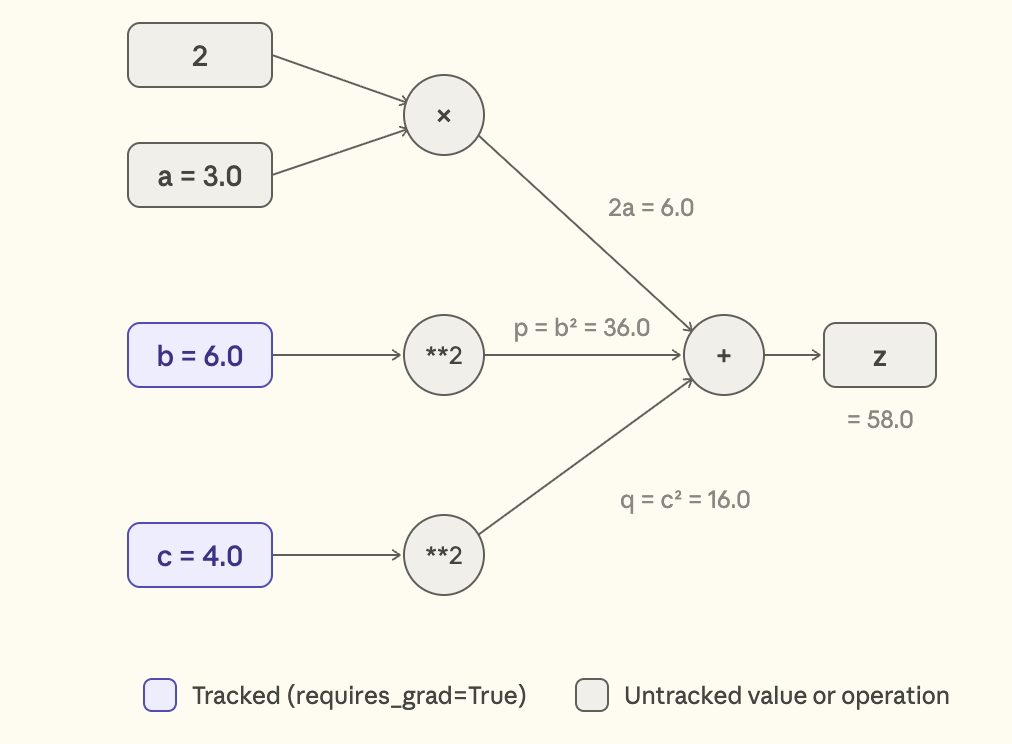
For example let’s consider this equation where b and c are tracked and a is not tracked using requires_grad=True :
a = torch.tensor(3.0)
b = torch.tensor(6.0, requires_grad=True)
c = torch.tensor(4.0, requires_grad=True)
z = 2*a + b**2 + c**2
The forward pass graph would look like this :
Now to walk the graph in reverse for back propogation, to compute the gradients it would look like this -
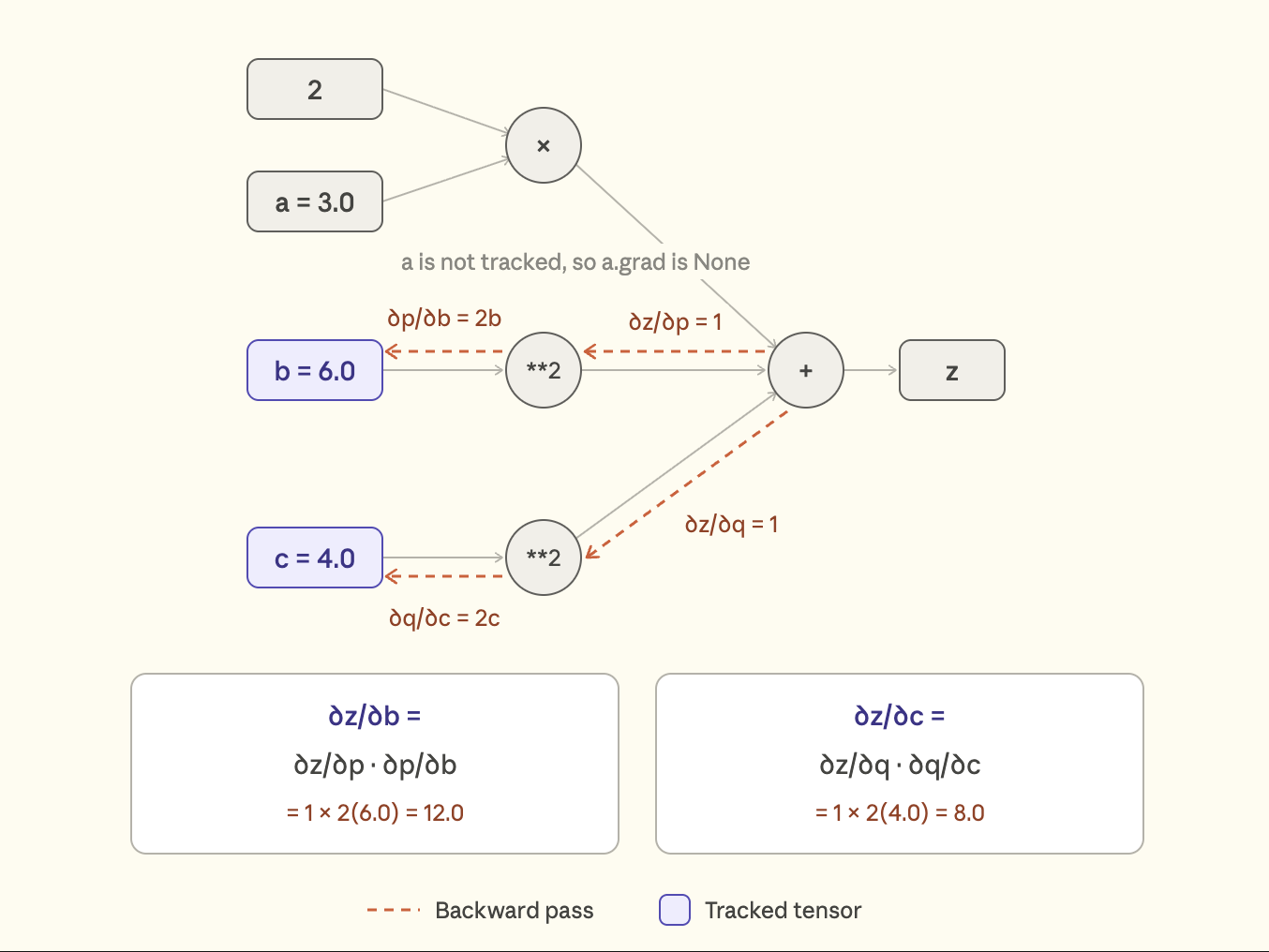
So while we backpropogate, this is how the answers would look like
z.backward()
print(a.grad) # None
print(b.grad) # 12.0
print(c.grad) # 8.0
What happened here is that PyTorch’s autograd engine constructed a computational graph in the background. Since a was not marked with requires_grad=True, it was never part of the recorded graph, so no gradient was computed for it and a.grad is `None.
Notes:
-
By default, PyTorch frees the computation graph after
.backward()finishes, to save memory. Calling.backward()again requires running the calculation again to build a new graph. -
.gradis the attribute where PyTorch stores the computed gradient of each tracked tensor. In a neural network, the Flavors of Optimizers reads these values to update the weights. -
requires_grad=Trueworks only with floating-point (or complex) tensors, such astorch.float32. Using it on an integer tensor fails immediately with:RuntimeError: Only Tensors of floating point and complex dtype can require gradients
Building a Multi layer Neural Network
So far we have tensors, autograd, optimizers, and a loss function. Now let’s put them together by training a small neural network on a real dataset. I have considered the Pima Indians Diabetes dataset for this section.
It has 8 medical measurements per patient (glucose, BMI, age, etc.), and the task is to predict whether the patient has diabetes (Outcome = 1) or not 0. This is a binary classification problem.
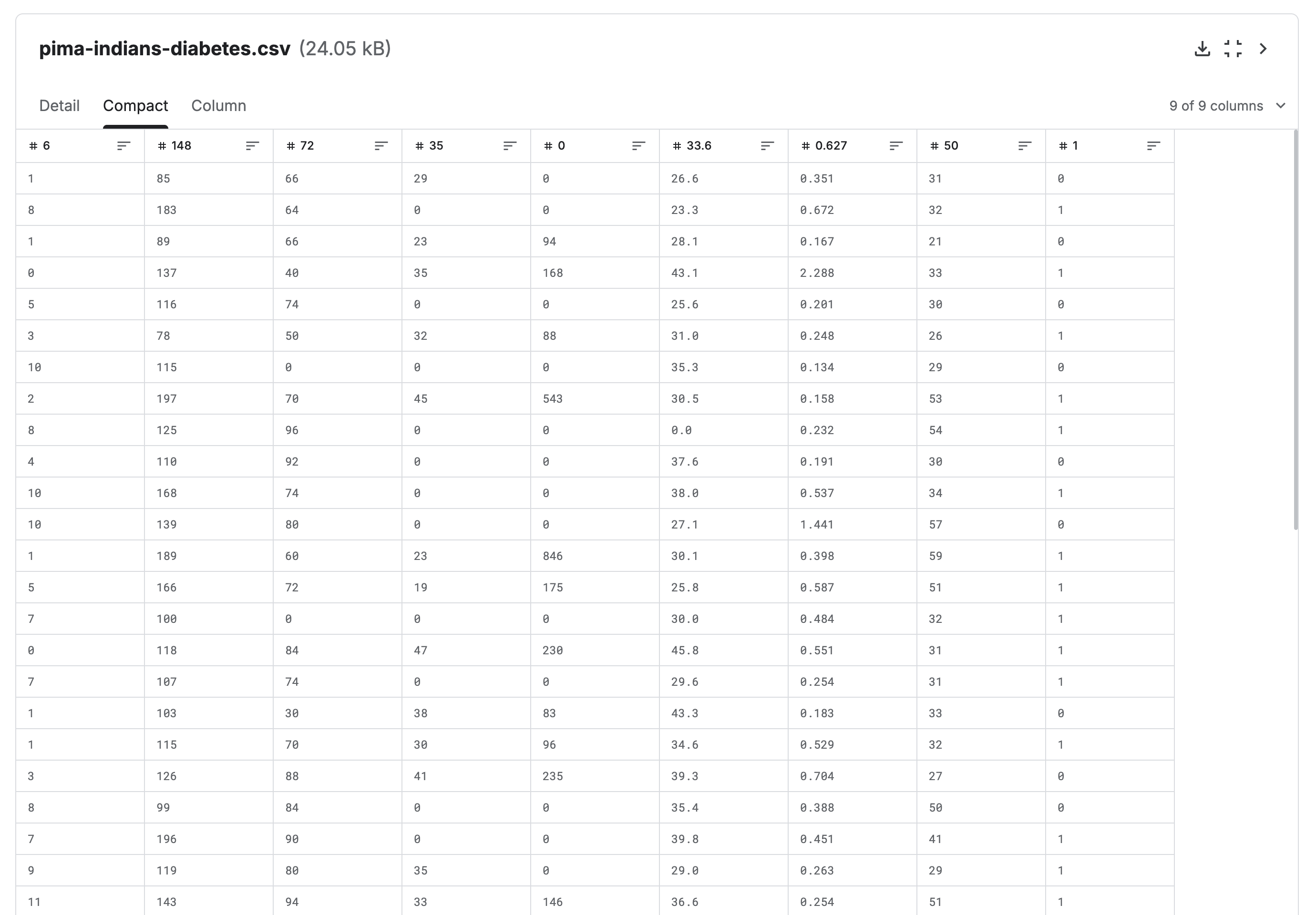
Lets build a neural network that looks like this :
8 inputs → Linear(8→25) → ReLU → Linear(25→15) → ReLU → Linear(15→1) → logit
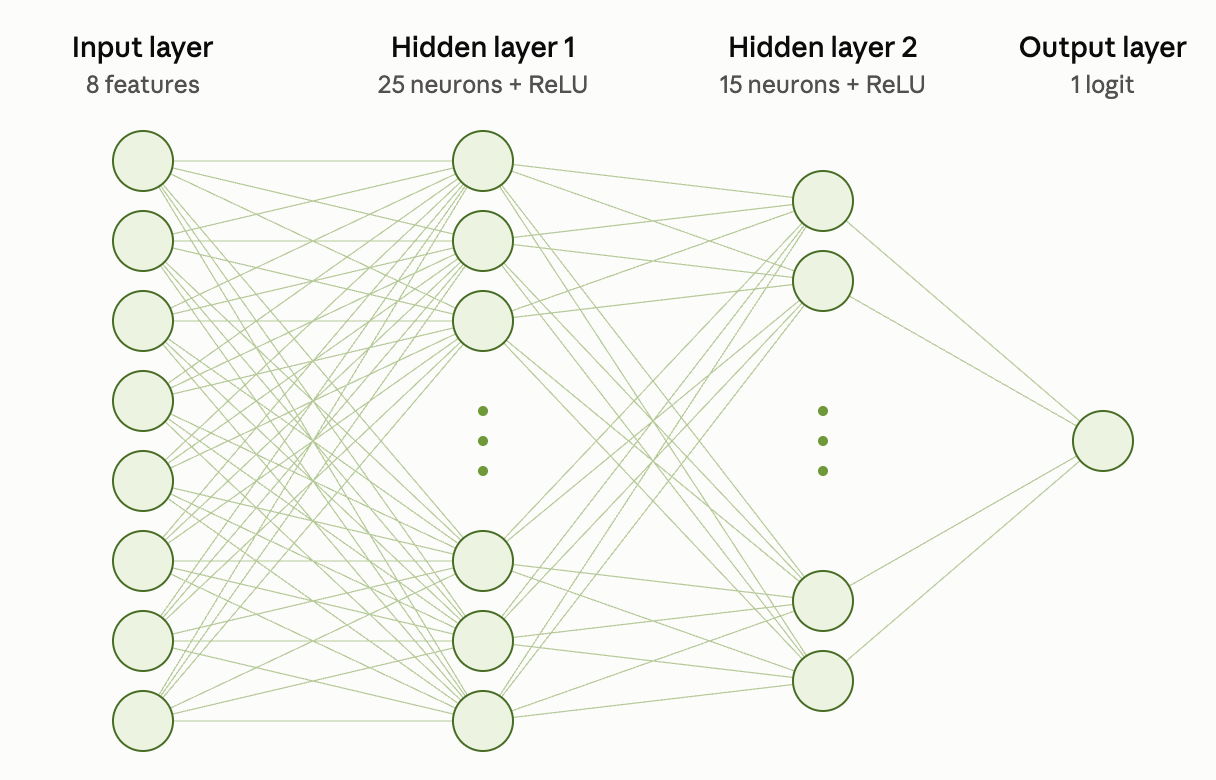
The 8 inputs are the patient’s features. The two hidden layers have 25 and 15 neurons, and the last layer outputs a single raw score called a logit. (We don’t apply a sigmoid ourselves, because the loss function handles that internally.)
Step 1: Preparing the data
Let’s load our data using pandas, and lets create a train-test-split of the dataset.
import pandas as pd
import torch
from sklearn.model_selection import train_test_split

df = pd.read_csv('diabetes.csv')

X = df.drop(columns="Outcome").values
y = df["Outcome"].values

x_train, x_test, y_train, y_test = train_test_split(
    X, y, test_size=0.2, random_state=42, stratify=y
)

x_train = torch.tensor(x_train, dtype=torch.float32)
x_test  = torch.tensor(x_test,  dtype=torch.float32)
y_train = torch.tensor(y_train, dtype=torch.long)
y_test  = torch.tensor(y_test,  dtype=torch.long)
stratify=y keeps the proportion of diabetic and non-diabetic patients the same in the train and test sets.
Step 2 : Standardizing the feature
The features are all in different range and scale (insulin can be in the hundreds, while pregnancies are in single digits). This inconsistency would affect the gradient. So we standardize each feature to mean 0 and standard deviation 1.
mean = x_train.mean(dim=0)
std  = x_train.std(dim=0)

x_train = (x_train - mean) / std
x_test  = (x_test  - mean) / std
Standardization (z-score) is different from normalization, normalization squeezes values into a fixed range like 0 to 1:
(x - min) / (max - min).
Important: the mean and std are computed from the training data only and then these are applied to the test data. Using test data statistics would leak information about the test set into training.
Step 3 : Dataset and DataLoader
Dataset class: Defines how to access individual samples, usually through __getitem__(). We can create separate Dataset objects for training, validation, and testing.
DataLoader class: Takes a Dataset object and creates a DataLoader object that handles loading individual samples, assembling them into batches, and optionally shuffling them.
from torch.utils.data import TensorDataset, DataLoader

train_ds = TensorDataset(x_train, y_train)
test_ds  = TensorDataset(x_test,  y_test)

train_dl = DataLoader(train_ds, batch_size=16, shuffle=True)
test_dl  = DataLoader(test_ds,  batch_size=16, shuffle=False)
TensorDataset is a shortcut for writing a custom Dataset class with __init__, __getitem__ and __len__. We shuffle the training data so batches differ each epoch, but there’s no need to shuffle the test data.
With shuffle=True, PyTorch reshuffles the sample order at the beginning of each new epoch, so our batches can contain different combinations of rows each epoch.
Step 4 : Define the model
class MyNeuralNetwork(torch.nn.Module):
    def __init__(self, num_inputs):
        super().__init__()

        self.layers = torch.nn.Sequential(
            torch.nn.Linear(num_inputs, 25),
            torch.nn.ReLU(),
            torch.nn.Linear(25, 15),
            torch.nn.ReLU(),
            torch.nn.Linear(15, 1),   # raw logit, no sigmoid here
        )

    def forward(self, x):
        return self.layers(x)
We create a neural network using nn.Module class, where :
__init__(): Defines and initializes the layers that the neural network will use.forward(): Defines how the input data passes through those layers to produce the output.- Each
Linear(in, out)holds a weight matrix and a bias vector, so the number of parameters isin × out + out
model = MyNeuralNetwork(num_inputs=8)
print(sum(p.numel() for p in model.parameters() if p.requires_grad)) # 631
That’s (8×25+25) + (25×15+15) + (15×1+1) = 225 + 390 + 16 = 631 trainable parameters. Every one of them is a tensor with requires_grad=True, which is exactly what the optimizer updates.
Step 5 : Initialize model and Optimizer
import torch.nn.functional as F

torch.manual_seed(123)
model = MyNeuralNetwork(num_inputs=8)
optimizer = torch.optim.Adam(model.parameters(), lr=0.001)
For the loss we use F.binary_cross_entropy_with_logits.
Binary: raw logits → BCEWithLogitsLoss (handles sigmoid internally)
Multiclass: raw logits → CrossEntropyLoss (handles softmax internally)
Step 6 : The training loop
Epoch = one full pass over the dataset.
Backprop happens once per batch, not once per epoch.
num_epochs = 50
best_val_loss = float("inf")

for epoch in range(num_epochs):

    # ---- training ----
    model.train()
    train_loss_total = 0
    for x_batch, y_batch in train_dl:
        logits = model(x_batch).squeeze(1) # invokes forward()
        loss = F.binary_cross_entropy_with_logits(logits, y_batch.float())

        optimizer.zero_grad()   # 1. clear old gradients
        loss.backward()         # 2. compute new gradients
        optimizer.step()        # 3. update weights

        train_loss_total += loss.item()
    train_loss = train_loss_total / len(train_dl)

    # ---- validation ----
    model.eval()
    val_loss_total = 0
    with torch.no_grad():
        for x_b, y_b in test_dl:
            logits = model(x_b).squeeze(1)
            val_loss_total += F.binary_cross_entropy_with_logits(
                logits, y_b.float()
            ).item()
    val_loss = val_loss_total / len(test_dl)

    if (epoch + 1) % 5 == 0:
        print(f"Epoch {epoch+1:03d}/{num_epochs} | train_loss={train_loss:.4f} | val_loss={val_loss:.4f}")

    # save the best model so far
    if val_loss < best_val_loss:
        best_val_loss = val_loss
        torch.save(model.state_dict(), "best_model.pth")

print("Best val loss:", best_val_loss)
train_loss is the average training loss for one epoch, In simple words what we did there in the training phase was we calculate the loss for each batch, add all those losses together, and divide by the number of batches to get the average training loss for one epoch.
Why optimizer.zero_grad()?
Gradients accumulate by default. If you call .backward() twice without clearing, PyTorch adds the new gradient to the old one (e.g. 0.4 + 0.3 = 0.7), This means gradients keep accumulating across batches. Calling optimizer.zero_grad() before every batch clears the previous gradients, ensuring that each weight update uses only the current batch’s gradients.
What do model.eval() and torch.no_grad() do?
model.eval()switches the model to evaluation mode. It matters for layers like dropout and batch norm, which behave differently at inference time.torch.no_grad()stops PyTorch from building the computation graph, which saves memory and time because we aren’t training here.
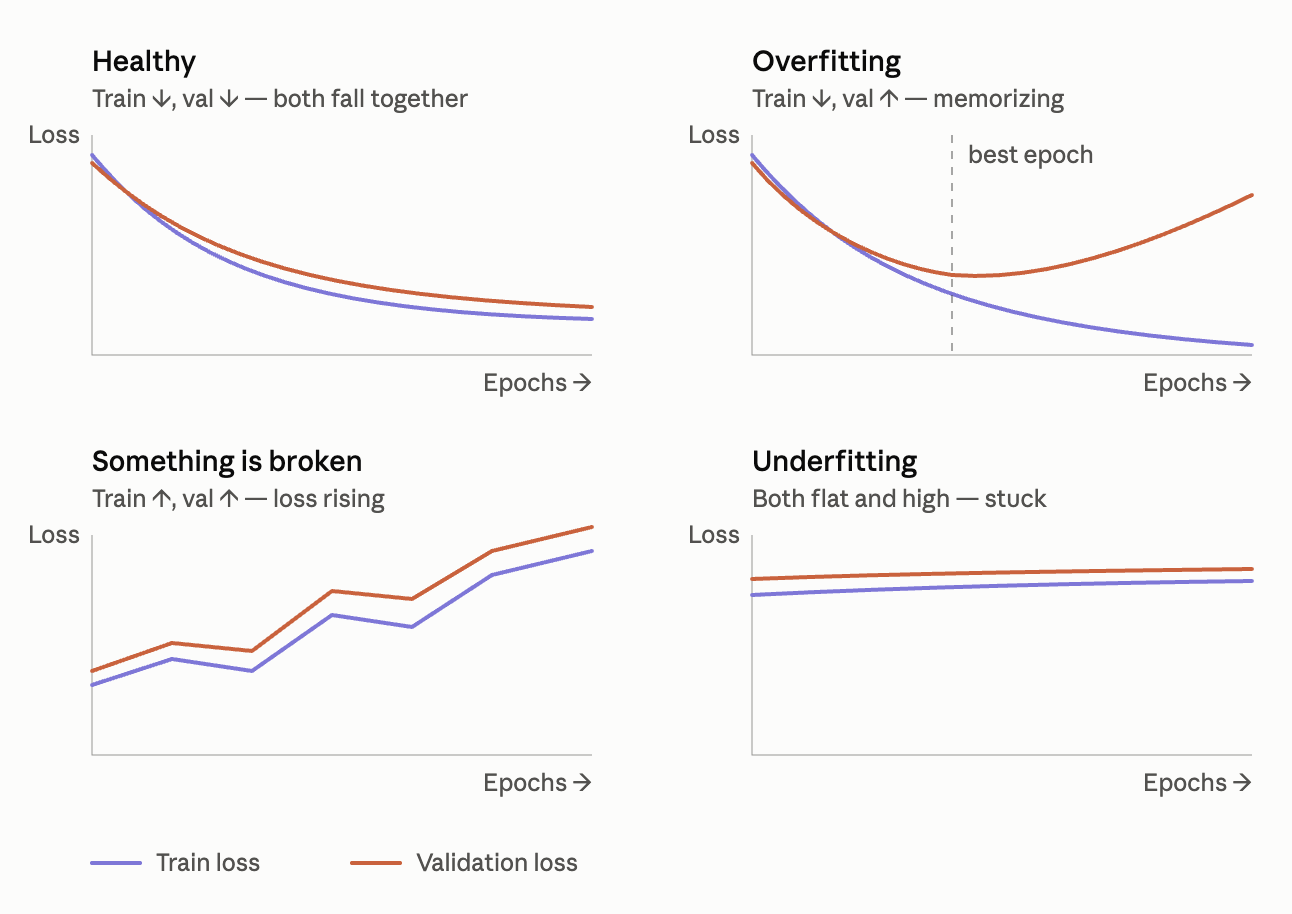
Reading the loss curves
| Pattern | Meaning |
|---|---|
| train ↓, val ↓ | Healthy: the model is learning patterns that generalize |
| train ↓, val ↑ | Overfitting: memorizing the training data |
| train ↑, val ↑ | Something is broken (learning rate too high, bad data, etc.) |
| both flat and high | Underfitting: model too simple, or not trained long enough |
Step 7: Measuring accuracy
Loss is good for training, but accuracy is easier to interpret. We pass the logit through a sigmoid to get a probability, then threshold at 0.5:
Lets compute both train and test accuracy :
def compute_accuracy(model, dataloader, threshold=0.5):
    model.eval()
    correct, total = 0, 0
    with torch.no_grad():
        for x_batch, y_batch in dataloader:
            logits = model(x_batch).squeeze(1)
            probs = torch.sigmoid(logits)
            predictions = (probs > threshold).long()
            correct += (predictions == y_batch).sum().item()
            total += len(y_batch)
    return correct / total

model.load_state_dict(torch.load("best_model.pth", weights_only=True))
print("Train accuracy:", compute_accuracy(model, train_dl))
print("Test accuracy:",  compute_accuracy(model, test_dl))
Step 8 : Saving and loading the model
We save only the state_dict (the learned weights), not the whole model object. To reuse it, recreate the same architecture and load the weights into it:
# 1. recreate the exact same architecture (untrained)
model = MyNeuralNetwork(num_inputs=8)

# 2. load the saved weights
model.load_state_dict(torch.load("best_model.pth", weights_only=True))

# 3. switch to eval mode before predicting
model.eval()
We will look into multi GPU training sometime later.