1. What is CORS ?
CORS is Cross-Origin Resource Sharing. It is a violation of the Same Origin Policy (SOP) of browsers.
First lets understand what is SOP ?
Same Origin Policy is a web security mechanism built into web browsers that influences how one website can access another.
Without SOP, another malicious website or web application could access another without restrictions, causing security vulnerabilities, allowing attackers to attack and steal sensitive data or perform actions without user consent.
SOP need not be turned on; it automatically comes with browsers.
The SOP mechanism was basically built to prevent CSRF(Cross-Site Request Forgery) attacks.
But What is Origin?
2 URLs are said to have the same origin if protocol, host and port are the same for both.
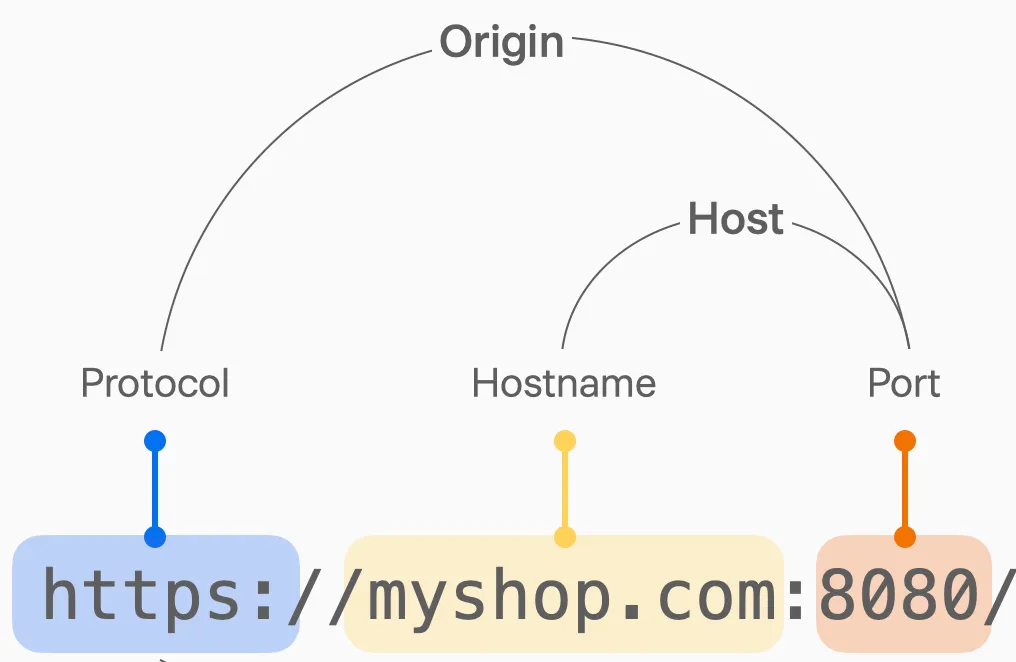
But why backend developers need to implement CORS? If CORS not implemented on the backend then we usually see an error like this on the frontend.
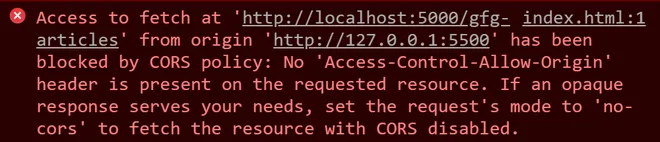
Though we are backend engineers working on backend, but we also have the frontend application. And frontend URL and backend URLs origins differ, meaning:
Frontend URL: http://127.0.0.1:5500
Backend URL: http://localhost:5000/
Although both are local, their hostnames and ports differ → different origins → SOP violation → and hence it fails with a CORS error saying “blocked by CORS policy: No ‘Access-Control-Allow-Origin’. So how do we avoid this?
How to avoid CORS error ?
CORS can be avoided by using additional HTTP headers to grant browser permission to access resources from a different origin, meaning a different server. Using CORS headers, you can inform the browser that a resource from another origin has the right to access resources on your page.
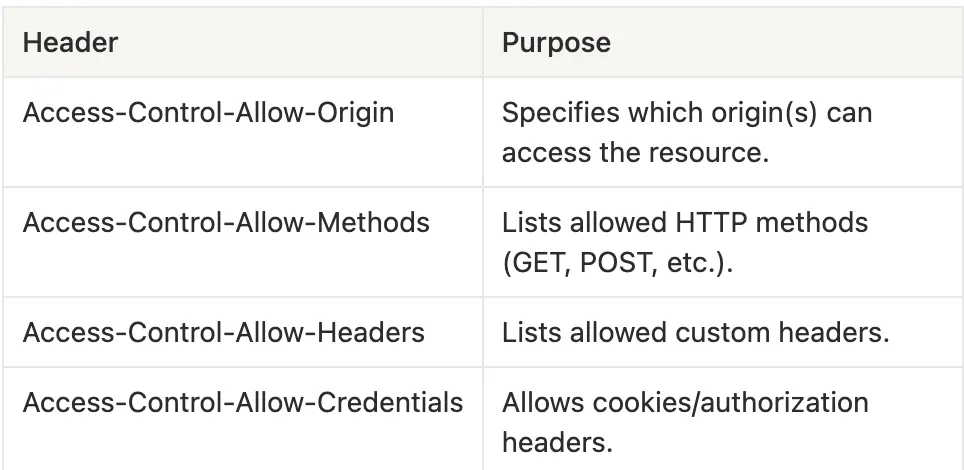
Access-Control-Allow-Origin
This is the most important CORS header, because it tells the browser which origins are allowed to access your backend resources.
When a frontend (for example, http://127.0.0.1:5500) tries to call an API hosted on another origin http://localhost:5000, the browser checks the response headers from that backend. If it finds a valid Access-Control-Allow-Origin header matching the frontend’s origin, the request is allowed; otherwise, it fails with a CORS error.
Allow all origins (public API)
Access-Control-Allow-Origin: *
This means any website can access your API. Useful for public endpoints (e.g., OpenWeatherMap API which is a public API for weather data).
Allow a specific origin
Access-Control-Allow-Origin: https://frontend.company.com
Here, only requests coming from https://frontend.company.com are allowed to access this backend which is recommended for restricted APIs.
Fixing CORS in Python Flask
from flask import Flask
from flask_cors import CORS

app = Flask(__name__)
# CORS(app) // this allows all origin
CORS(app, origins=["http://127.0.0.1:5500"]) # this allows just that url.
Now you can explore this in other languages.
CORS has 2 flows
When the frontend makes a request to the backend on a different origin, the browser decides how to handle it.
Depending on how safe the request is CORS can take 2 flows:
1. Simple Request
A simple request is one that the browser considers safe so it sends the request directly without asking for permission first.
This type of request should follow these rules.
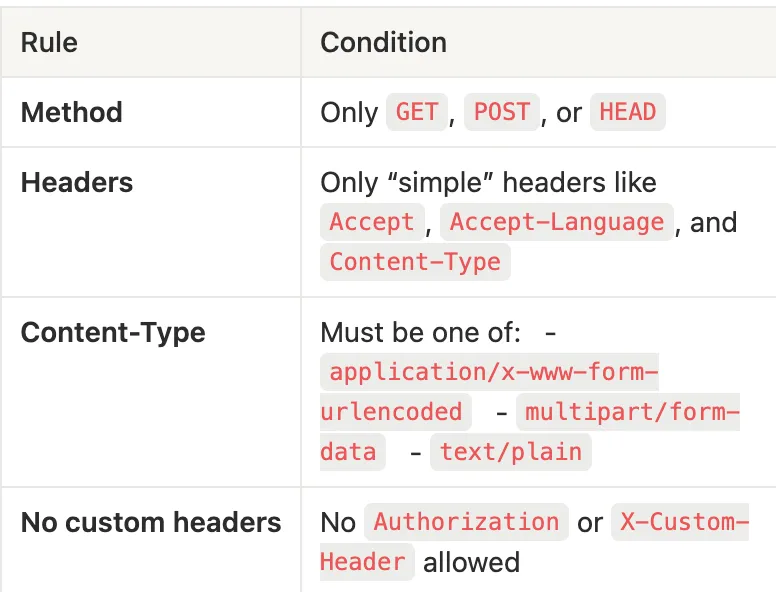
2. Preflight Request Flow
If the browser sees a non-simple or if it feels that a particular request is risky, it performs a preflight check before sending the real request.
This preflight is a small HTTP request sent using the OPTIONS method it’s the browser’s way of asking the backend for permission first before performing the real action.
A preflight request happens when it satisfies one of the 3 conditions:
- The method is not
GET,POST, orHEAD, meaning mostly when it isPUT,DELETE,PATCH. - The request includes custom headers (e.g.,
Authorization,X-Custom-Header) - The
Content-Typeis not one of the 3 simple types.

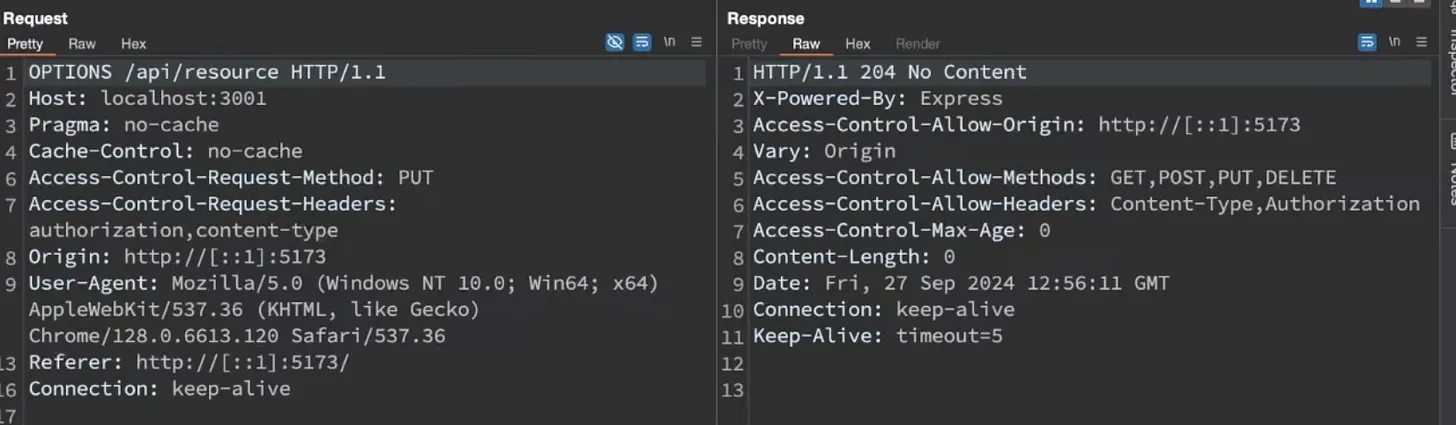
From the image the OPTIONS request means that :
- Method →
OPTIONSthe browser is asking for permission. - Access-Control-Request-Method → tells the server: “I plan to make a
PUTrequest.” - Access-Control-Request-Headers → lists all custom headers that will be included later (
authorization,content-type).
And the response from the OPTIONS request means that:
- 204 No Content → this is a success response with no body (typical for preflights).
- Access-Control-Allow-Origin → confirms which origin is allowed
- Access-Control-Allow-Methods → lists all HTTP methods that are permitted for further requests
- Access-Control-Allow-Headers → approves which custom headers can be used for further requests.
And that’s it, you now understand what CORS really is, why browsers enforce it, and how the two request flows (simple and preflight) work behind the scenes.
As a backend engineer, always remember: browsers aren’t blocking you for fun, they’re protecting you and other users.